iPhone alarm not going off? The settings to check
A quiet iPhone alarm is almost always a setting, not a fault. The checks that matter, including iOS 27's new alarm volume slider and the Face ID feature that turns your alarm down.
Your alarm was set. It didn't ring, or it rang so quietly you slept straight through it. On an iPhone this is almost always a setting rather than a fault, and usually one of about six.
Work down this list in order. Most people find it in the first three.
Start with the boring three
Is the alarm actually on? Open the Clock app and check the toggle next to the alarm is green. A one-off alarm switches itself off after it rings.
AM or PM? A 6:30 alarm set to PM looks right at a glance and rings at dinner time.
Is the sound set to None? Open the alarm, tap Sound, and make sure something is selected. With None, the alarm only vibrates.
Check the volume alarms actually use — this changed in iOS 27
Either way, start in Settings > Sounds & Haptics. What you find there depends on your iOS version.
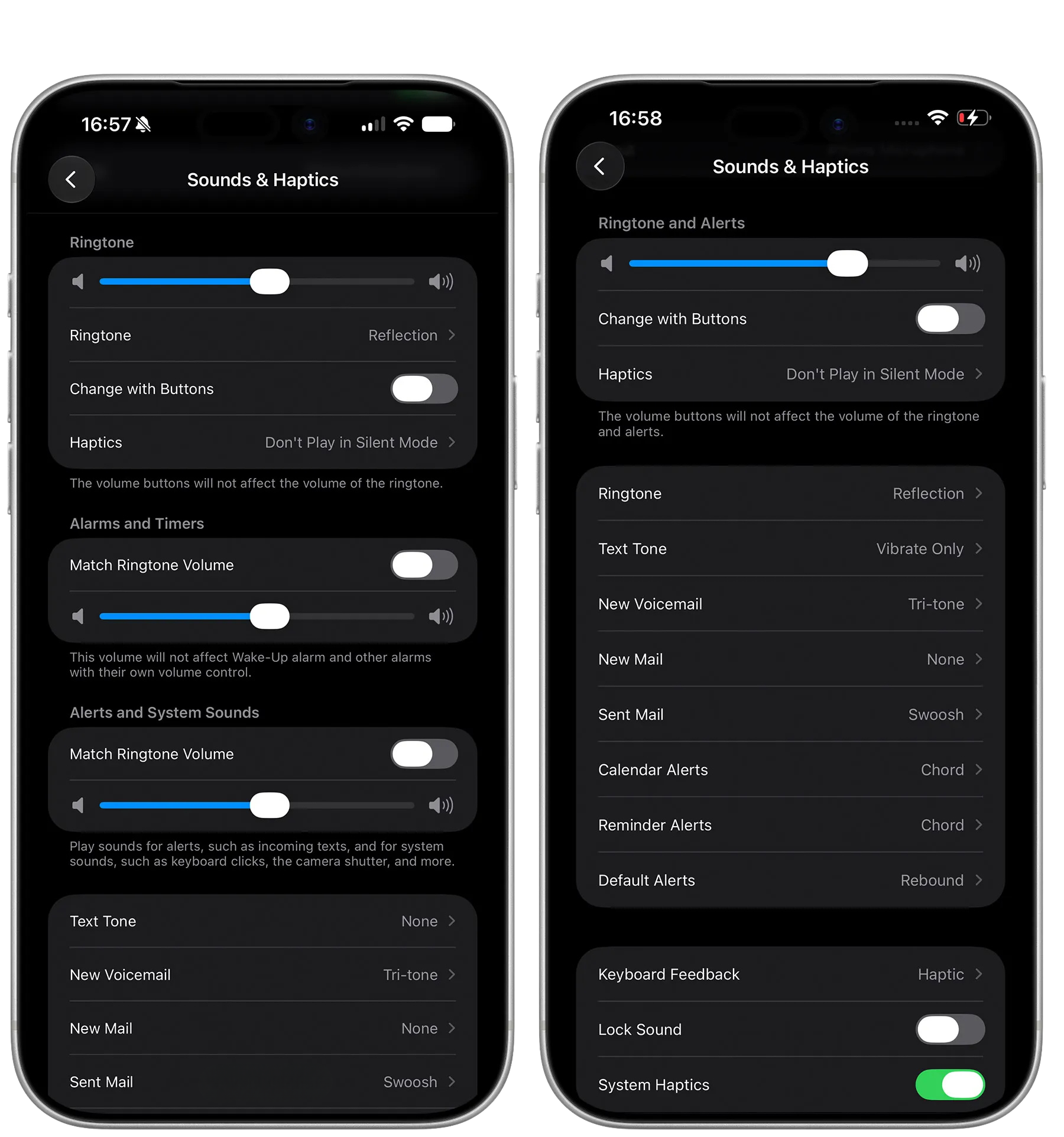
On iOS 27, alarms can have a volume of their own. Under Alarms and Timers, turn off Match Ringtone Volume and drag the slider up. Leave that toggle on and alarms keep following the ringer, as they always did.
On iOS 26 and earlier, there is one slider, Ringtone and Alerts, and alarms follow it. Turning the ringer down at a concert turns your morning alarm down too.
Either version: alarms use the ringer volume, never the media volume, so turning music down before bed changes nothing. And if your iPhone is set to let the side buttons change that volume, one accidental press in a pocket can leave the alarm at a whisper.
Silent Mode and Focus are not the problem
If your iPhone is on silent, the Clock app's alarms still ring. The same goes for Do Not Disturb and other Focus modes: Apple deliberately lets alarms through, so you don't sleep through one.
So if a Clock alarm stayed quiet, silent mode isn't the culprit. Keep going down the list.
The Face ID setting that turns your alarm down
This one surprises people. If your iPhone can see that you're looking at it, it lowers the volume of alerts, alarms included. A phone lying on the nightstand facing you can start the alarm at a mumble instead of full volume.
To switch it off: Settings > Face ID & Passcode, enter your passcode, scroll down and turn off Attention Aware Features.
The trade-off is that your iPhone will no longer dim the screen or quieten notifications while you're looking at it. For a lot of people, a reliable alarm is worth that.
If you use a third-party alarm app
Alarm apps other than Clock have two extra failure points.
Alarm permission. The first time the app sets an alarm, iOS asks whether to allow it. If you tapped Don't Allow, it can't set any alarms at all. Turn the permission back on in the Settings app, then open the app so it can set them again.
Silent Mode. In our own testing, a third-party alarm on silent played for about ten seconds and then went quiet. The Clock app's alarms don't behave that way. If you rely on another alarm app, leave the ringer switch on.
One thing that is not a fault: on an iPhone, every alarm app shows the system's Stop button, and no app can remove it. We wrote about why that is, and what actually gets you up.
Test it the way you sleep
A test at your desk proves very little. Do it the way the morning actually happens.
Set an alarm for three or four minutes from now.
Leave the ringer at the volume you sleep with.
Lock the phone, put it where it sits at night, and don't touch it.
If it rings loudly enough to wake you from across the room, you're done.
Still quiet? Three last things
Restart the iPhone. It costs a minute and clears the occasional stuck alarm.
Update iOS. Alarm bugs do happen, and they get fixed in updates.
Delete the alarm and set it again. Faster than hunting for what's wrong with an old one.
If the alarm rings at full volume in the test above but you still sleep through it, the problem isn't the phone any more. That's the point where a louder sound, a different tone, or an alarm that asks you to do something before it stops is worth trying.
The short answer
Check that the alarm is on, set to AM, and has a sound. Turn the ringer slider up. Turn off Attention Aware Features so your iPhone stops quietening the alarm when it sees your face. If you use another alarm app, make sure it's allowed to set alarms and leave the ringer on. Then test it once, locked, at sleeping volume.
More from this category
Will my alarm change when the clocks go back?
No — a phone alarm keeps its time when the clocks change on 25 October and 1 November. The one hour that happens twice, and three things that can still catch you out.
Will my alarm go off in airplane mode?
Yes — airplane mode does not stop an alarm. But three things can: a dead battery, an alarm sound that needs the internet, and a phone still on the old time zone. What to check before an early flight.
iOS 27 finally gives alarms their own volume
For seventeen years one slider controlled ringtones, alerts and alarms. iOS 27 splits them: how to set your alarm louder than your ringer, and what it still doesn't fix.