iOS 27 finally gives alarms their own volume
For seventeen years one slider controlled ringtones, alerts and alarms. iOS 27 splits them: how to set your alarm louder than your ringer, and what it still doesn't fix.
For seventeen years, an iPhone had one volume for ringtones, alerts and alarms. Turn the ringer down for a meeting, forget to turn it back up, and your alarm was just as quiet the next morning. iOS 27 finally splits them apart.
What changed
Settings > Sounds & Haptics now has three separate groups:
Ringtone — calls.
Alarms and Timers — your morning alarm and any timer.
Alerts and System Sounds — messages, mail, keyboard clicks, the camera shutter.
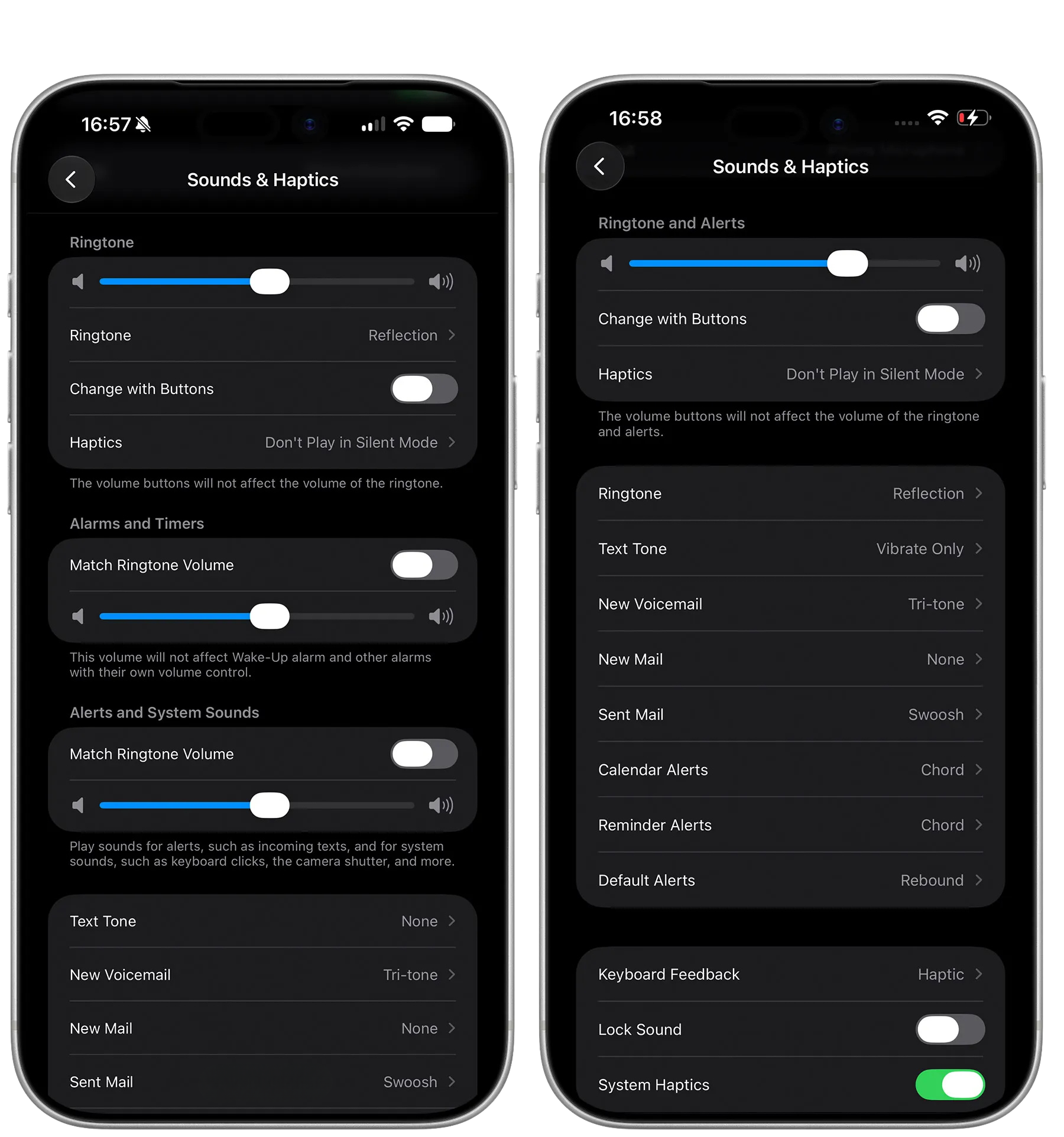 Each group has a Match Ringtone Volume switch. Leave it on and that group follows the ringer, exactly as before. Turn it off and the group gets a slider of its own.
Make your alarm louder than everything else
Open Settings > Sounds & Haptics.
Under Alarms and Timers, turn off Match Ringtone Volume.
Drag the slider that appears up to where you want it.
That's it. Your ringer can now live at a polite level all day while your alarm stays loud enough to wake you.
The same trick works in reverse for alerts: turn off Match Ringtone Volume under Alerts and System Sounds and drop that slider, so notifications stop being as loud as your alarm.
Two things it doesn't fix
Silent Mode. The ring/silent switch is separate from all of this. Apple's own Clock alarms still ring when your iPhone is silenced, so for most people this doesn't matter. Other alarm apps behave differently, which is worth testing if you rely on one.
Alarms with their own volume setting. Apple's own note under the slider says as much: this volume doesn't apply to the Wake Up alarm from your sleep schedule, or to other alarms that carry a volume of their own.
Is it worth updating for?
If you have ever been woken late by an alarm that was quiet because of something you did the night before, yes. It's a small setting that removes a whole category of "my alarm didn't go off" mornings — the kind that are really "my alarm went off at ten percent volume".
To check whether you have it: Settings > General > Software Update.
While you're in there
If your alarm has been letting you down, the volume is only one of the usual suspects. We wrote a longer list of what to check — including the Face ID setting that quietly turns your alarm down when it sees you — in iPhone alarm not going off? The settings to check.
More from this category
Will my alarm change when the clocks go back?
No — a phone alarm keeps its time when the clocks change on 25 October and 1 November. The one hour that happens twice, and three things that can still catch you out.
Will my alarm go off in airplane mode?
Yes — airplane mode does not stop an alarm. But three things can: a dead battery, an alarm sound that needs the internet, and a phone still on the old time zone. What to check before an early flight.
iPhone alarm not going off? The settings to check
A quiet iPhone alarm is almost always a setting, not a fault. The checks that matter, including iOS 27's new alarm volume slider and the Face ID feature that turns your alarm down.